Posts

Aggressive yet sane persistent SSH with systemd and autossh

Image
Not too long ago, I was contracted to assist with a K8 deployment. The developers' approach to persistent SSH tunnels left something to be desired. Autossh is a great tool for persistent SSH connections; I use it mostly for reverse port and Unix socket forwarding. No punching holes in firewalls, no exposing services to the Internet. I love it. Folksy guides like these suggest restarting autossh immediately on failure, ignoring TCP's connection teardown state entirely. That gap is exactly what this post addresses. Systemd is a better wrapper: autossh handles the connection lifecycle, systemd handles startup ordering, restart timing, and environment variables. They compose well. One caveat worth stating upfront: SSH tunnels carry TCP inside TCP, which is fine for low-volume use (a socket forward, a management port, a small database connection) but will hit congestion collapse under high load and packet loss. It is why production VPNs use UDP . For the low-volum...
Anycasting IPv6 TCP and UDP

Image
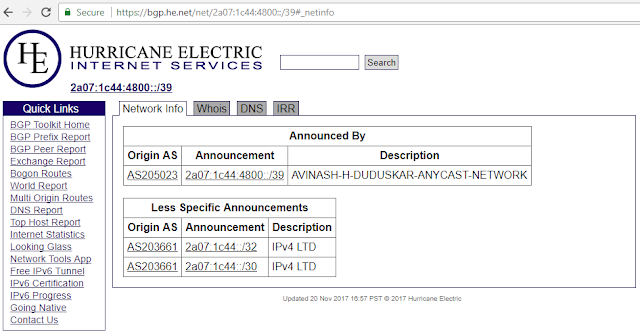
Anycasting IPv6 TCP and UDP Inspired by LinkedIn's own Samir Jaferali's post on Building your own anycast network in 9 steps . Register for an ASN via an LIR, I used  ip6.im and Fairnode , who gave me a free /39 IPv6 prefix of the type ( ASSIGNED, ALLOCATED-BY-LIR ) . PI is "ASSIGNED PI" or "ASSIGNED ANYCAST" (special). PA is ALLOCATED-BY-RIR, ALLOCATED-BY-LIR, AGGREGATED-BY-LIR and ASSIGNED. Things I wish I knew : You  cannot  announce any of your network prefixes outside of RIPE regions, these are for use in RIPE regions only. The exception to this is anycast traffic. ASN and IP prefixes that fall under RIPE can be announced and anycasted in the world as long as one PoP has a RIPE region presence. This can be as easy as a virtual machine in Europe whose location can be occasionally confirmed via traceroute. Dear APNIC, why can't you be as easy to work with? RIPE registration and role types to create: inet6num mntner organisation...

LEDE/OpenWRT on a PC Engines APU2(c4)

Image
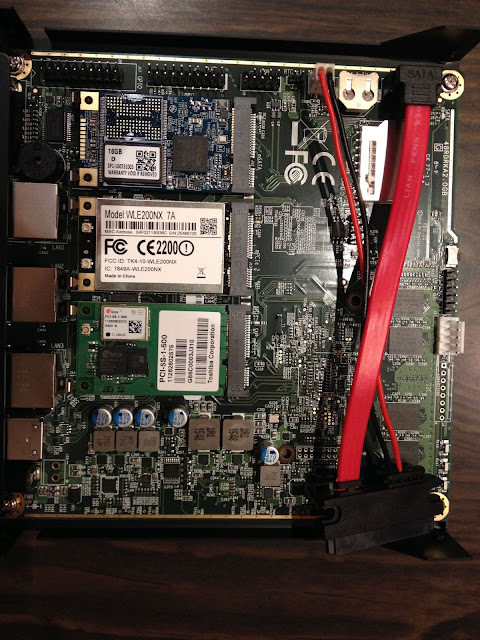
The PC Engines APU2 is a fanless 1 Ghz quad-core AMD GX-412TC x64 Jaguar SoC 4 GB DDR3-1333 ECC DRAM 3 Intel i210AT ethernet ports mSATA slot 2 mini-pcie slots, one attached to a SIM card holder for GSM modems All in all, a pretty decent bit of kit to manage even 1 G Internet, assuming all of it isn't VPN. Mine's currently managing two 50/50 Mbit PPPoE and a VDSL 24/2 Mbit line. I bought it to keep up with the symmetric 50 mbit line I upgraded to and have resources left over for IPsec VPNs, IPv6 tunnels, cjdns tunnels, DN42 BGP VPNs and BIRD6 for my own IPv6 PI space. Standard LEDE install The LEDE devs decided not to have separate targets for the APUx series of boards and went with standard x86 target support. Patches for APU2 board support are in mainline LEDE now so they can be installed via opkg . This is great as you need just dd LEDE version >= 17.01 .1 with luci on to the SSD/HDD/SD/USB, run opkg update and then install these...

IPsec and IKEv2 Android VPN

Image
Isn't SSH everyone's favorite quick and dirty VPN? Get Putty, setup browser to use the SSH connection as a proxy and you're good to go. Not long after DARPA released ESP, IPsec emerged as the de facto standard for creating encrypted tunnels to move data over the Internet between two geographically separate networks. It works at Layer 3, it's application agnostic and built right in to TCP with tighter integration in IPv6. It's adoption outside of corporate endpoints remains less than stellar, and for good reason. A typical conversation between a young developer Alice, wanting to secure her fledgling application's communication with her Network Engineer mate Bob, who works at a multi-homed Tier 4 datacenter in VRF hell. Alice : Hey mate, I'm deploying my application via Docker and would like to use a VPN to communicate between my Docker hosts. My M2M devices use 6LoWPAN and IPsec seems perfect. Bob :  Uhh, 6LoWPAN? Not my area of expertise but ...

SRCDS TF2, L4D and the like

Image
#!/bin/sh # # Simple script to start TF2 server # Sat Dec  8 17:43:19 IST 2012 # # NOTE: This expects the TF2 server to be run as user "tf2server" # # Ensure this script is run as tf2server (EUID 500 in our case) only. if [[ $EUID -ne 500 ]]; then    echo "This script can ONLY be run as user: tf2server"    echo `/bin/grep tf2server /etc/passwd`    echo "Perhaps you're root? Your EUID seems to be $EUID"    exit 1 fi # User specified game vars MAP="jump_4starters_a9" MAXPLAYERS="24" GAMEIP="192.168.1.113" GAMEPORT="27015" GAMEPID="/home/tf2server/pids/tf2d.pid" GAMEDIR="/home/tf2server/hlds/gameserver/orangebox" GAMEBIN="./srcds_run" STEAMBIN="/home/tf2server/hlds/steam" GAMEOPTS="-game tf -autoupdate -steambin $STEAMBIN -maxplayers $MAXPLAYERS +map $MAP +ip $GAMEIP -port $GAMEPORT -pidfile $GAMEPID" # Nothing beyond this needs editing...